
Your mobile app is moving money. Health records. Identity. Across networks the user never thinks to question — a hotel Wi-Fi, an airport captive portal, a coffee shop router that might be running something nastier than just bad speeds. The TLS layer is the only thing standing between that data and someone who's decided today is a good day to intercept it. SSL pinning exists to make that layer a lot harder to fake. It's your app saying: "I know exactly who I'm supposed to be talking to. Anyone else can get lost."
Here's the problem. The pinning approach that worked five years ago is quietly falling apart. Certificate lifetimes are collapsing — we're heading toward 47 days. An app shipped with a hardcoded pin can get locked out of its own backend within weeks. Bypass tooling has gone from "requires a skilled attacker" to basically point-and-click. And Google's own Android security docs now actively warn developers away from naive static pinning.
This guide is the longer version of that conversation. We'll go through what SSL pinning actually is, how it works at the handshake level, why every serious mobile app should still care about it, the different types to choose from, why static pinning is increasingly a liability in 2026, and how dynamic pinning fills the gap. By the end, you'll know which approach fits your app — and what to ship next.
SSL pinning — also called certificate pinning, TLS pinning, or identity pinning — is a technique that binds your app to a specific, expected server identity. Instead of trusting any certificate signed by any of the hundreds of root certificate authorities pre-installed on the device, your app trusts only what you decide ahead of time: a specific server certificate, its public key, or the public key of whoever issued it.
In a normal TLS connection, your phone basically says: "I'll trust whoever this certificate chain leads back to, as long as one of those root CAs is in my trust store." That sounds reasonable until you think about what's baked into that trust store. Hundreds of CAs. Different jurisdictions. Varying security postures. One misissued certificate, one compromised intermediate, one malicious root pushed through an MDM profile — and the whole model breaks.
Pinning shrinks that trust set down to essentially one. Instead of "trust any of these CAs," your app says "trust only this specific public key." If the TLS handshake produces anything different, the app kills the connection before a single byte of application data goes anywhere.
For mobile apps specifically, this matters more than it does for browsers. Browsers warn the user. Mobile apps fail silently and have already shipped the payload. And mobile apps live on devices you don't control — jailbroken phones, MDM-managed devices, phones on hostile networks. Pinning is the most direct lever a developer has to tell the runtime: "do not negotiate this away, no matter what."
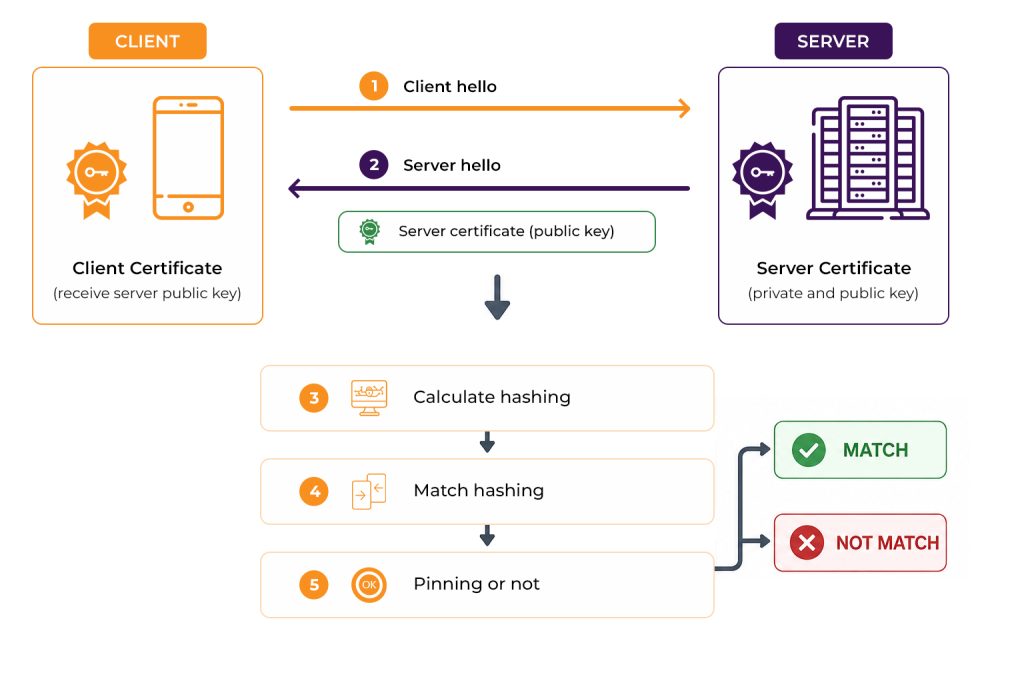
To really get pinning, it helps to walk through a normal TLS handshake first — then see exactly where the pin check gets inserted.
Step 1: ClientHello
Your app initiates the connection. It sends a ClientHello to the server with the TLS versions it supports, cipher suites it can use, a random nonce, and (in TLS 1.3) the key share material it wants to work with.
Step 2: ServerHello and the certificate chain
The server replies with its chosen cipher, its own nonce, and — the important part — its certificate chain. That chain is what links the server's public key to its hostname, signed by an intermediate CA, which is in turn signed by a root CA your device already trusts.
Step 3: Default certificate validation
Without pinning, the OS validates the chain: checks expiry, signature integrity, hostname matching, and walks back to a trusted root in the system store. If everything checks out, the handshake continues. This is exactly the step a malicious CA or a compromised intermediate can subvert.
Step 4: The pin check — this is the new part
With pinning enabled, the app does an additional check before declaring the chain valid. It takes one element of the presented chain — usually the SHA-256 hash of the SubjectPublicKeyInfo (SPKI) of the leaf certificate or an intermediate — and compares it against a list of pins it either ships with or has fetched. If the hash doesn't match anything on the list, the app aborts the handshake. No application data is exchanged. Nothing gets through.
Step 5: Key exchange and encrypted traffic
Only if both checks pass — standard CA validation plus the pin check — does the handshake complete and requests start flowing. Once the tunnel is up, the pin's job is done. It doesn't affect throughput. It just made sure the tunnel was built with the right person.
On Android, this check typically lives in OkHttp's CertificatePinner, in <pin-set> entries in the Network Security Configuration file (Android 7+), or in a custom X509TrustManager. On iOS, it's usually implemented by overriding URLSession's authentication challenge delegate, or through a library like TrustKit. The APIs are different; the underlying logic — hash the SPKI, compare against an allowlist, accept or reject — is identical.
Once you understand pinning as a stricter form of certificate validation, the real question is: which threats does that strictness actually neutralize, and is it worth the operational cost?
"SSL pinning" is an umbrella. Under it sit several distinct techniques that differ in what's actually pinned, where the pin lives, and how it gets updated. Choosing between them is a genuine engineering decision.
| Pinning Type | What's Pinned | Survives Cert Rotation? | Update Mechanism | Best For |
| Certificate pinning | Leaf certificate | No | App release | Apps that rarely rotate certs |
| Public key pinning | SPKI hash | Yes (if key reused) | App release | Most production apps today |
| Intermediate/Root CA | Issuer SPKI | Yes | App release | Enterprise apps with private PKI |
| Static pinning | Hardcoded in binary | Only with same key | App store release | Apps with long release cycles |
| Dynamic pinning | Fetched/rotated at runtime | Yes | Secure remote update | Modern apps on short cert lifecycles |
Static pinning was defensible when TLS certificates lasted two or three years. That world is gone — and the reasons it's failing now compound on each other in an unpleasant way.
If your app outage post-mortem has ever included the words "we forgot to update the pin" — you're running static pinning on a backend whose lifecycle has already outgrown it.
Dynamic pinning keeps what's valuable about pinning — your app refuses to talk to a server it doesn't recognize — while dropping the brittle assumption that the recognition data has to be frozen at build time.
Here's how it works in practice. The app ships with a small set of long-lived trust anchors — signing keys controlled by the security team, separate from the public TLS certificate. These don't rotate often, so they can safely be hardcoded. On startup (and periodically after that), the app fetches a signed pin manifest describing the currently valid pins for each backend host. The manifest is signed by the trust anchor, so the app can verify it before applying anything. When the backend rotates a certificate, the security team publishes a new manifest. The next time the app checks in, it picks up the new pins. No release. No outage. No panicked Slack messages at 2am.
If a manifest fetch fails, the app falls back to its previously cached, valid pin set — not to "no pin at all." The fallback is graceful, but it's never silent.
Where AppInGuard fits into this. AppInGuard's Smart Pinning is a production implementation of this model. Instead of building manifest signing, distribution, rotation, and monitoring from scratch — which is genuinely hard to get right — the SDK handles all of it. Certificate rotations on your backend show up in app pin sets within minutes, without a release. The trust anchors and the manifest signing path are independent of the public CA ecosystem, so a CA compromise doesn't move the needle. And because the system was designed for the 47-day cert lifecycle from day one, your release calendar is no longer coupled to your TLS calendar.
What you keep: protection against MITM, rogue CAs, and proxy interception — actually strengthened. What you drop: brittleness, kill-switch anti-patterns, the rebuild-and-resubmit cycle, and the slow organizational drift toward "we disabled pinning because it kept breaking things."
Different apps have different threat models. Different teams have different release cadences. Here's an honest decision guide:
SSL pinning still does what it always did. It tells your app exactly which server it's allowed to talk to, and it refuses to be argued out of that position by a malicious network or a compromised CA. That job is more important than ever, because mobile apps now sit at the center of how people move money, prove identity, and access health information.
What's changed is the cost of getting it wrong. Static pinning, frozen into a binary that ships through a week-long store review and reaches users over a multi-week curve, was workable when certificates lasted two years. It's not workable when certificates don't. The right move isn't to abandon pinning — that's how MITM attacks walk back into your threat model. The right move is to keep pinning and make it dynamic, so your security control actually matches the velocity of the rest of your stack.
If you're building from scratch, design for dynamic pinning from day one. If you're already pinning statically and your cert lifecycle is about to halve, this is the year to migrate — not next year.
AppInGuard's Smart Pinning was built for exactly this transition: secure by default, certificate-rotation-safe, and decoupled from your release calendar. Pin the app. Just pin it for the world your app actually ships into.
Next steps: See how Smart Pinning prevents outages caused by static pinning while protecting your app against MITM attacks and CA compromise. Explore the AppInGuard features page for a technical overview, or read The Hidden Risks of Ignoring SSL Pinning in Mobile App Development to understand why static SSL pinning is no longer sustainable and why dynamic SSL pinning has become essential.
Secure Your App Today.
Take 60 seconds to protect your mobile app. Our team handles the rest.